Spectrum Explorer (spEXplore)
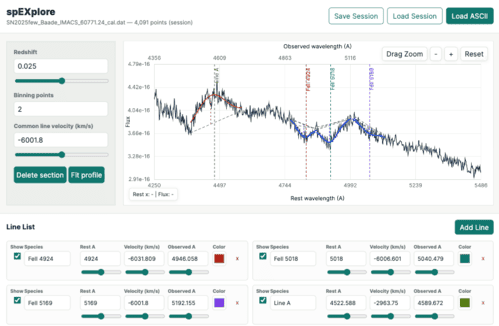
spEXplore is an astronomical spectrum exploration and analysis tool designed primarily for the study of supernova spectra. It assists with spectral line identification, line-profile fitting, and measurements of line properties such as wavelength, equivalent width (pEW), full width at half maximum (FWHM), and redshifted or blueshifted line velocities.
You can start with a Demo session with various featured used, and then click on the Demo button in the app to see more demos.
Features:
Spectrum Visualization
- Load astronomical spectra from ASCII-format file.
- Apply de-redshift corrections and display both observed and rest-frame wavelength axes.
- Smooth noisy spectra by binning.
- Interactively zoom into regions of interest.
- Delete and restore selected spectrum sections interactively.
- Download plot view as image or download raw ASCII data behind the plot to regenerate spectrum and fit profiles with other plotting software.
Line Identification
- Mark multiple spectral features using their rest wavelengths, with customizable labels and colors.
- Shift line markers by specifying either line velocity or observed wavelength.
- Mark set of lines by species name, and adjust their velocities and redshift.
- Adjust velocities individually for selected lines or collectively for all marked lines.
- Line wavelengths and velocities can be interactively adjusted with sliders.
- Select line labels and rest wavelengths directly from the built-in spectral line database.
Spectral Line Fitting
- Interactively fit sloped Gaussian profiles to spectral features.
- Multiple fitting methods are available for various continuum and data region selection
- Two point fitting - user marks two point on the plot around the line of interest, which defines the continuum line, then profile is fitted within this selected x-region.
- Four point fitting - in this first two marked points defines the continuum like Two point fitting method, but in addition user marks two more points around the line of interest, within this x-range of the data the profile is fitted.
- Six point fitting - user marks two point (x-range) on the region of continuum on the left side (left or right order not relevant) of the line, then does the same for the right side continuum. These two regions are fitted by a straight line to determine the continuum. Then two more point are marked on bases on the both sides of the line, which determines the x-range for fitting the profile.
- Zero continuum fitting - in this no continuum is estimated and subtracted, i.e., either spectrum is continuum subtracted or no subtraction needed. Then user user just marks two points around the line to select the region of profile fitting.
- Multi profile fitting - to fit N multiple profile combined to a blended feature, with various sub-options to constrain the fit process.
- Measure line profile parameters
- Mean - central wavelength of fitted profile
- FWHM - full-width-half-maximum of the fitted profile
- Height - Height or depth of the fitted profile (unit is data Intensity unit)
- pEW - pseudo equivalent width from fitted profile
- Flux - integrated area under the curve, (unit is spectral Intensity unit times Angstrom)
- pEW(direct) - pEW measured directly from the data withing the marked range
- FWHM(direct) - FWHM measured from data. Data section is Savitzky–Golay smoothened with optimally chosen degree, and then max and half-max crossing points are measured.
- Flux(direct) - integrated area from the data.
- Mean vel. - central wavelength converted to doppler velocity
- FWHM vel. - FWHM converted to doppler velocity
- Specify rest wavelengths for fitted features to calculate blueshifted or redshifted (doppler) line velocities.
- Automatically associate fitted profile with the nearest displayed line identifications, to pick up line labels and rest wavelengths. Thus, for easier workflow, it is recommended to first mark spectral line identifications before performing profile fitting. Note, automated pickup of line label and wavelength for a fitted profile works only for single marked lines, not with line sets, this a design choice to avoid unexpected results.
- Compile measurements from all fitted lines into a single results table, and can be downloaded in CSV or JSON format.
- Can append results in the table from multiple spectra analysis, while auto matching columns when appending.
- Optionally combine multiple fits of the same spectral line by calculating weighted mean parameter values. When averaging measurements, the standard deviation is automatically computed and combined with weighted uncertainty of the measurements, and reported as the final uncertainty.
Entire analysis session can be saved to a file, as it is in the current view, which can be loaded later to continue analysis.
Refer to online documentation for more detailed usage instructions.
Error estimation
To obtain realistic uncertainties from spectral line-profile fitting, special attention must be given to the fitting procedure. spEXplore is specifically designed to simplify this process and provide robust error estimates.
It is advised to read the Error estimation section in the documentation to follow the recommended methodology for obtaining meaningful errors.